Enhancing Appwrite’s : A Journey in Open Source Contribution By Mahdi Alsalami
Sep 25, 2024
Enhancing Appwrite’s : A Journey in Open Source Contribution By Mahdi Alsalami
About the Project
Appwrite is an open-source backend platform that revolutionizes the way developers build web, mobile, and Flutter applications. It provides a comprehensive suite of APIs that handle essential backend tasks such as authentication, databases, storage, and more. This powerful toolkit enables developers to focus on creating amazing user experiences without getting bogged down in backend complexities.
The importance of Appwrite in the developer ecosystem cannot be overstated. By offering a robust, scalable, and secure backend-as-a-service, Appwrite empowers developers to build applications faster and more efficiently. It democratizes access to advanced backend features, allowing developers of all skill levels to create sophisticated applications that can compete with those built by large tech companies.
Typical users of Appwrite are developers working on various platforms who seek to streamline their backend development process. For instance, a web developer building a new social media platform could use Appwrite to handle user authentication, store user data, and manage file uploads. This allows them to focus on creating unique features and a great user interface, rather than reinventing the wheel with backend infrastructure.
The Issue
The specific issue I addressed during my internship was improving the formatting of the AI assistant’s replies in the response block (GitHub issue #917) . This issue was crucial because it directly impacted the usability and effectiveness of Appwrite’s AI assistant feature. At first me and my teammates Cameron Shimmin, Nguyen Giang, and Kyle Tran had issue “Adding Invalid Domain to Function Doesn’t Throw an Error #1040” but the issue was taken so our mentor Marcello San Agustin issued another issue which was Github issue #917: https://github.com/appwrite/console/issues/917.
The problem was that when the AI assistant returned responses containing Markdown-formatted text (such as links, bold text, or italics), they were not being properly rendered in the user interface. Instead of seeing clickable links and formatted text, users were seeing raw Markdown syntax, which significantly hampered readability and functionality. Key locations in the codebase relevant to this issue were primarily in the frontend UI components responsible for rendering the AI assistant’s responses, as well as any utilities handling markdown parsing or text formatting.
Codebase Overview
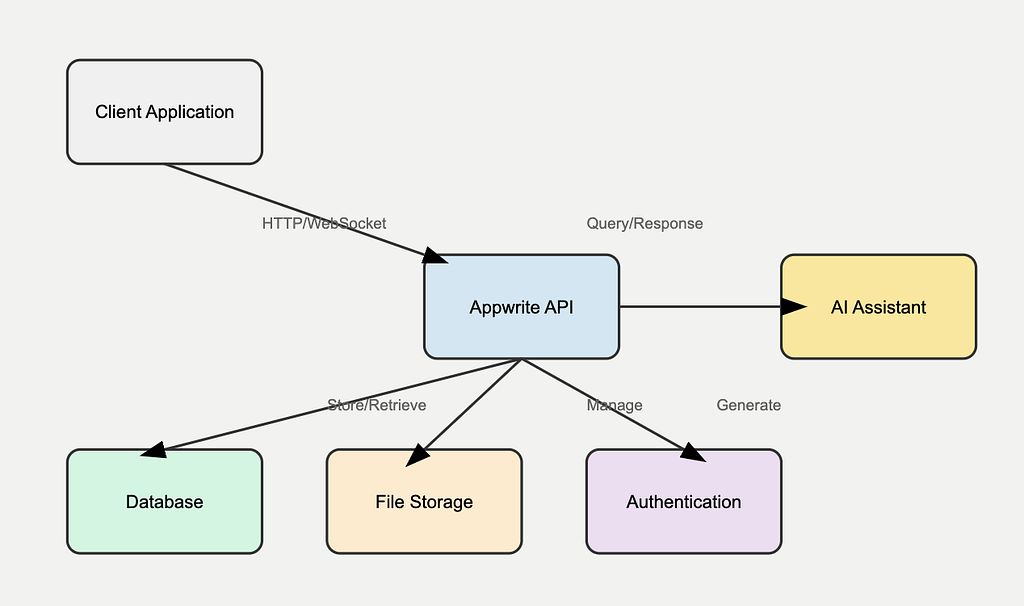
To understand the context of our work on the AI assistant, it’s essential to have a clear picture of Appwrite’s overall architecture. Below is a system diagram that illustrates the main components of Appwrite:
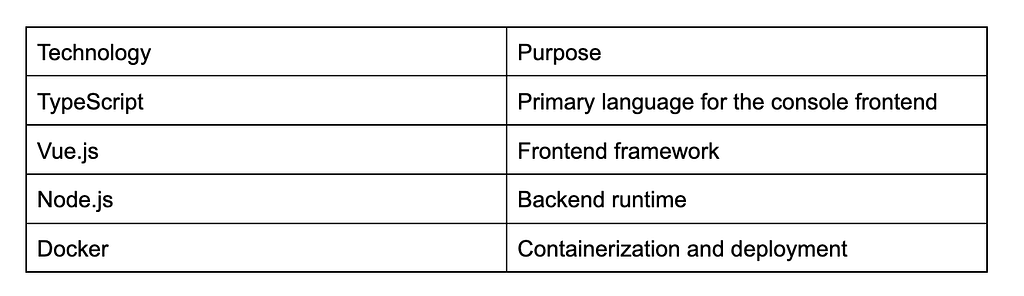
Here’s an overview of Appwrite’s tech stack:
Flow of Control Diagram:
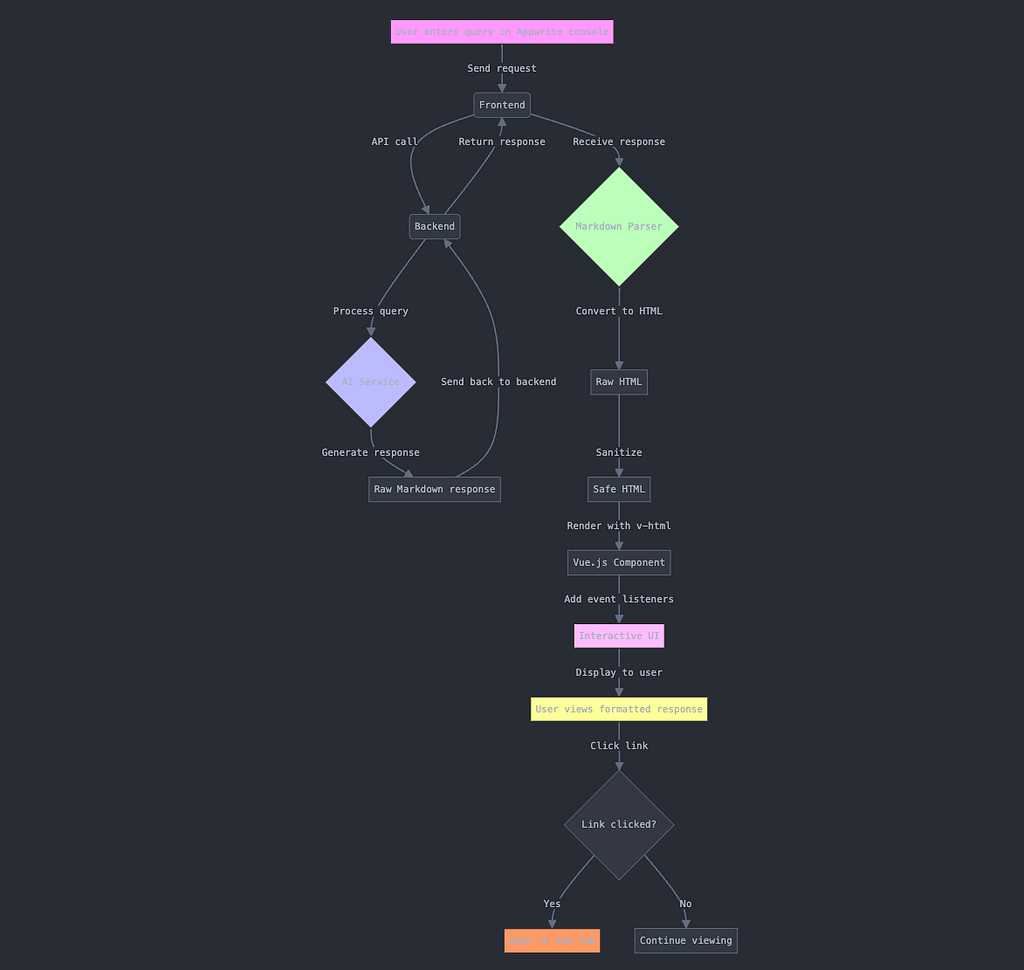
The typical workflow for the AI assistant feature:
- A user enters a query in the Appwrite console UI.
- The frontend sends this query to Appwrite’s backend.
- The backend processes the query and forwards it to the AI service.
- The AI service generates a response, which may include Markdown formatting.
- The backend sends this response back to the frontend.
- The frontend renders the response in the UI (this is where our formatting issue occurred).
- The user views the properly formatted response with clickable links and correct text styling.
A significant technical challenge I faced was ensuring that links within the AI assistant’s responses were both properly formatted and securely handled to open in new tabs. This required a delicate balance between preserving the functionality of the Markdown links and maintaining the security of the application.
To address this challenge, I took the following steps:
- Researched various Markdown parsing libraries compatible with Vue.js to find one that could handle our specific needs.
- Experimented with different approaches to sanitize and render Markdown safely in the browser, ensuring that malicious code couldn’t be injected through the AI’s responses.
- Tested various methods of intercepting link clicks to open them in new tabs without compromising the user’s security.
- When I encountered difficulties, I reached out to my mentor and the Appwrite community on Discord. Their guidance was invaluable in understanding best practices for handling Markdown in a Vue.js application and ensuring that our solution adhered to Appwrite’s coding standards and security requirements.
Solution
The final solution involved implementing a Markdown parser on the frontend to convert the AI assistant’s Markdown responses into properly formatted HTML. We then used Vue.js directives to safely render this HTML and added event listeners to open links in new tabs.
Here’s a high-level overview of the implementation:
- When the AI assistant’s response is received, we pass it through a Markdown parser (e.g., marked.js).
- The resulting HTML is then sanitized to remove any potentially malicious scripts.
- We use Vue’s v-html directive to render the sanitized HTML in the UI.
- Event listeners are added to all links within the rendered HTML to ensure they open in new tabs.
To verify the solution, I created a comprehensive set of test cases with various types of Markdown formatting and links. These tests ensured that:
- All Markdown formatting (bold, italic, lists, etc.) was correctly applied.
- Links were clickable and opened in new tabs.
- Code blocks were properly formatted and syntax-highlighted.
- The solution worked across different browsers and devices.
This solution directly addresses the original problem by ensuring that users can now see properly formatted responses from the AI assistant, including clickable links, bold text, and italics. This significantly improves the readability and usability of the AI assistant feature, enhancing the overall user experience of the Appwrite console.
By implementing this solution, we’ve not only fixed a current issue but also laid the groundwork for potential future enhancements to the AI assistant’s capabilities. For example, we could now easily add support for more advanced Markdown features or even custom formatting options specific to Appwrite’s needs.

Original post on Medium.